AI Harness: Agentic Loop

In my previous post I covered the topic of Tool Calling. In that post I kind of jumped ahead in the Harness topic skipping over the actual loop the tools plug into.

I did that on purpose, I wanted to show that arguably the most important capabilities of the harness are all provided by something we’ve all been doing for decades - a simple callback handler. I wanted to demystify the topic a bit and show that quite simple primitives unlocks a lot of capability.

This does beg the question: Why if this is such a simple thing did I feel the need to devote 3,000 words to that one topic?

The reason is that we are working with exceptionally constrained resources. The context is finite and inefficient.

  1. The Context is small, the 1M token contexts of the frontier models are an absolute luxury, I often run my constrained Agents with 32K tokens or smaller contexts.
  2. The entire system is stateless requiring the harness to manage it. No help is coming, managing this resource is 100% up to the harness.

Most of us have either forgotten what it means to compute in constrained resources or were born in a time of abundant CPU or Memory resources.

It is these limitations that makes it necessary to manage the cache, perform progressive disclosure, do compactions and countless other techniques - that’s where the complexity lives.

If we had infinite contexts there would be no need for a lot of what we call breakthroughs in AI - no need for complex RAG systems, no need for progressively disclosed skills, no need for complex tool management etc.

So let’s start at the basics, we build a simple agent loop that will allow you to keep querying the agent in turn after turn.

Here is our earlier example made slightly more complex:

 1func main() {
 2	client := anthropic.NewClient() // reads ANTHROPIC_API_KEY
 3
 4	params := anthropic.MessageNewParams{
 5		Model:     "claude-opus-5",
 6		MaxTokens: 1024,
 7		System: []anthropic.TextBlockParam{
 8			{Text: "You are a terse assistant. Answer in one sentence."},
 9		},
10	}
11
12	in := bufio.NewScanner(os.Stdin)
13	for {
14		fmt.Print("> ")
15		if !in.Scan() {
16			return // ctrl-d or ctrl-c
17		}
18
19		params.Messages = append(params.Messages, anthropic.NewUserMessage(anthropic.NewTextBlock(in.Text())))
20
21		resp, err := client.Messages.New(context.Background(), params)
22		if err != nil {
23			log.Fatal(err)
24		}
25
26		params.Messages = append(params.Messages, resp.ToParam())
27
28		for _, block := range resp.Content {
29			if text, ok := block.AsAny().(anthropic.TextBlock); ok {
30				fmt.Println(text.Text)
31			}
32		}
33	}
34}

When I run this I can chat with the agent and ask it anything I want, and it will give me one sentence answers:

$ go run cmd/main.go
> What is answer to life, the universe and everything?
42 — per Douglas Adams' *The Hitchhiker's Guide to the Galaxy*, 
though the actual question remains unknown.

> Pick a random number between 1 and a 100
73

Read the full entry for the rest of this discussion.

[]
ai  choria  fisk 

AI Harness: Tool Calling

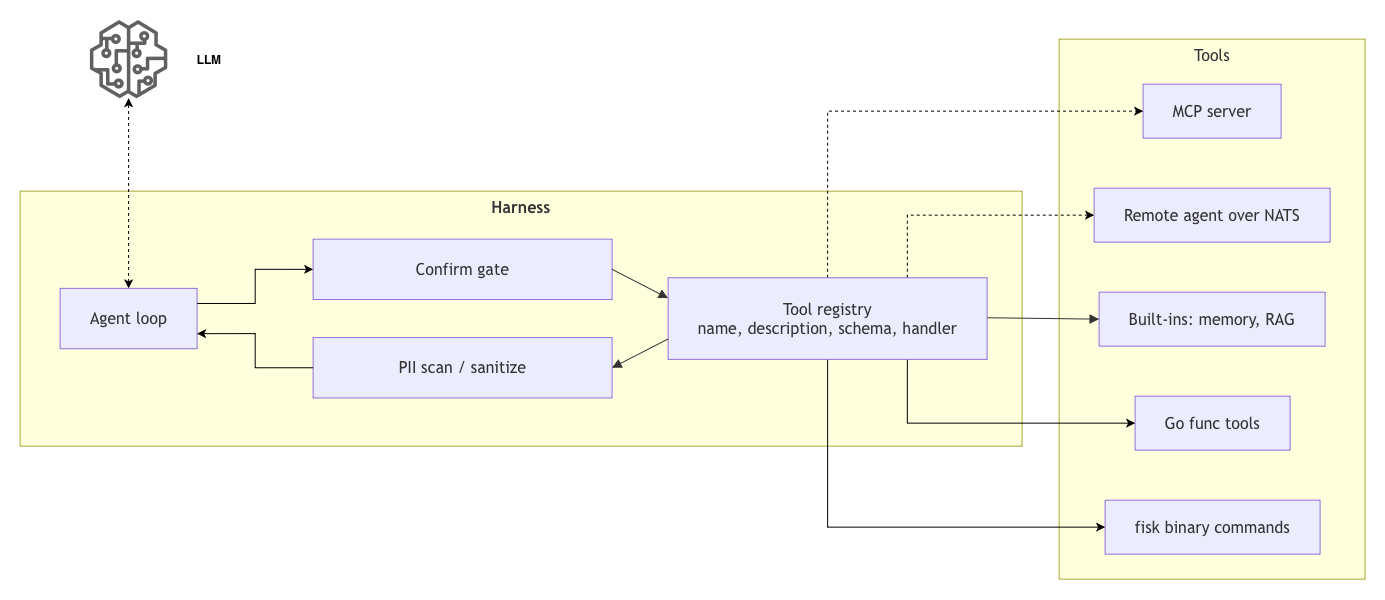
Tool calling is easily the most important extension point of any harness. A tool is how the LLM reach out to the world - access a service, interact with a IoT device, load data, write data, search knowledge, talk to an API, run shell scripts - it’s all just tool calls.

This is an area that’s hard to get right first time because of how many features it unlocks, so focus on making it flexible, abstract well and make sure code is modular and easy to change as your harness grows.

Choosing a model to use for most cases requires one trained to do tool use - some models are quite bad at this and will favor inventing their own data over tool calls and others are really great at it. Bigger is not always better either because bigger models will lean on their training data more. A recent released model openbmb/MiniCPM5-2B-GGUF is excellent at calling tools rather than inventing data, and it’s great at understanding what it received from knowledge bases while only being 2 billion parameters big.

Likewise, some models are great at dealing with many tools and some will just not be able to figure out what is the right tool for the job should there be many tools configured. It’s a balancing act. But this is more or less the only extension point that exist so it’s one that requires a good, flexible, design.

Tool Calling Architecture

NOTE: Shown here is not the exact text that goes to the LLM rather a representation encapsulated in my harness specific protocol, but this is derived from what the model APIs provide.

In the most basic sense, when you have tools configured and the model wish to run one or more tools it will answer your prompt with a message like this:

[
  {
    "protocol": "io.choria.fisk-ai.v1.session.assistant",
    "stop_reason": "tool_use",
    "in_tokens": 3538,
    "out_tokens": 121,
    "cache_read_tokens": 256,
    "thinking_tokens": 52,
    "assistant": {
      "iteration": 0,
      "message": {
        "role": "assistant",
        "content": [
          {
            "thinking": {
              "text": "The user is asking about work done to speed up testing, and the final outcome for the full suite.This is project-specific knowledge, so I should search the knowledge base first."
            }
          },
          {
            "tool_use": {
              "id": "call_4824d540e4454b3ab4d81396",
              "name": "knowledge_search",
              "input": {
                "query": "speed up testing full test suite outcome results"
              }
            }
          },
          {
            "tool_use": {
              "id": "call_629fd83516a94d43a730d46f",
              "name": "knowledge_enumerate",
              "input": {
                "query": "test suite speed"
              }
            }
          }
        ]
      }
    }
  }
]

Here we see a few important things:

  • stop_reason: tool_use - the turn resulted in output but it’s not the final output, it wants to use tools
  • we have 3 blocks here, one thinking and 2 tool_use
  • each tool_use has a unique ID and function to call and the input to pass to the function. Later we will see how the agent knows what the inputs are.
  • these are as far as the LLM is concerned executed in parallel and, you must send the result of all parallel calls in one response. By calling several tools it needs like this it’s often hedging it will need some information over the latency costs of round trips. I often see it read memories in case another tool call returns data that might require the memory.

At this point your harness just look for tool_use blocks and turn that into a function call. The LLM does not know the implementation details the call might be a REST call, Request-Reply over NATS, shell out to a CLI tool or anything really that will return some data.

After the tool is called the harness returns a result, here just showing the first call result, note we include the same tool_use_id as in the request this is how the model correlates what result belongs to what tool call:

{
  "protocol": "io.choria.fisk-ai.v1.session.tool_result",
  "tool_result": {
    "result": {
      "tool_use_id": "call_4824d540e4454b3ab4d81396",
      "content": "{\"tier\":\"tier: hybrid (FTS5 + vectors, RRF) - model=text-embedding-qwen3-embedding-0.6b.....\"}]}"
    }
  }
}

The agent will interpret this and decide how to follow up - more tool calls, more thinking or the final answer. It can be any string but JSON is the conventional output format.

You can also set is_error on the tool_result blocks which will cause the model to retry or adjust its input.

Also, important to note that tool output goes directly into your context and stays there, do not output 2MB of data from a tool call.

This is not particularly complex thing to do and the libraries from Anthropic, OpenAI etc. make this a very easy thing to do. This is foundational block that enables more or less everything else - Memory, RAG, MCP, API calls and more. It’s all built on this one capability.

There’s a lot of details to make this work, especially with many tools, so read the full entry for the details.

[]
ai  choria  fisk 

AI Harness Design Series

I recently released an AI Harness called Fisk AI and I want to do a series of posts on how the major components is designed. There’s a lot of mystery around Agent Harnesses, but really it is not magic or particular hard, it’s a different paradigm that enables some novel new behaviors, but ultimately it’s just an API client.

The purpose and background of the Fisk harness is best captured by the project announcement post, but, in short, it’s a harness that lets you use LLMs in a safe and constrained manner. Rather than all-powerful agents like Claude, Codex, Hermes etc I want to assemble an agent by starting with nothing and adding to it what I need via tools, guardrails and limits. In the end giving me complete visibility in what it can do in order to make it safe, secure, privacy respecting and potentially local only.

To build an agent you need no code at all, just a YAML file, like this one that lets me build an agent that can answer questions about OpenVox. Here is a slightly longer than typical example that creates a full chat experience where you are essentially talking with https://docs.openvoxproject.org. You get discussion grounded in documentation with full citations of every source linking directly back to the source material on the OpenVox website.

identity: OpenVOX
icon_url:  https://raw.githubusercontent.com/voxpupuli/logos/refs/heads/master/images/OpenVox/Sticker/HexagonSticker.svg

harness:
  knowledge:
    enabled: true
    expand_to_section: true
    read_tool: true
    paths:
      - openvox-docs/docs/_openvox_8x
      - openvox-docs/docs/_openvox-server_8x
      - puppet-specifications/language
      - types.md
    citations:
      - pattern: '^openvox-docs/docs/_openvox_8x/(.+).(markdown|md)$'
        replace: 'https://docs.openvoxproject.org/openvox/latest/$1.html#${anchor}'
      - pattern: '^openvox-docs/docs/_openvox-server_8x/(.+).(markdown|md)$'
        replace: 'https://docs.openvoxproject.org/openvox-server/latest/$1.html#${anchor}'

llm:
  model: deepseek/deepseek-v4-flash
  budget:
    max_tokens: 100000
    max_iterations: 50

system_prompt: |
  You help users based on a knowledge base of OpenVox information

  Every answer must be researched using the RESEARCH STRATEGY, presented using RESPONSE FORMAT and validated using 
  RESPONSE CHECKLIST.

  RESEARCH STRATEGY:
  - Use must use `knowledge_search` tool to find the direct answer
  - For broad topics, always perform at least 2-3 searches with different keyword angles to ensure comprehensive coverage

  OUTPUT FORMATS:
  - The target output is Markdown.
  - You can generate SVG images, display them in a code block with the language `svg`
  - You can make mermaid diagrams in code blocks with language `mermaid`

  RESPONSE FORMAT:

  Show citations to sources in the paragraph text in the form `(#ref)` or `(#ref)(#ref)` so that users know exactly where the
  information comes from. Citations may only include entries from `knowledge_search`. Citations matching the
  `ref` in the `knowledge_search` output.

Here I create a knowledge base that can answer questions about OpenVox by simply ingesting their documentation git repository. This is the sweet spot for this tool - just quickly assemble an agent that can bring some agentic abilities to your exiting files.

Here I use only Full Text Search and BM25 so it would work well without a local embeddings model - but you can opt into that if needed.

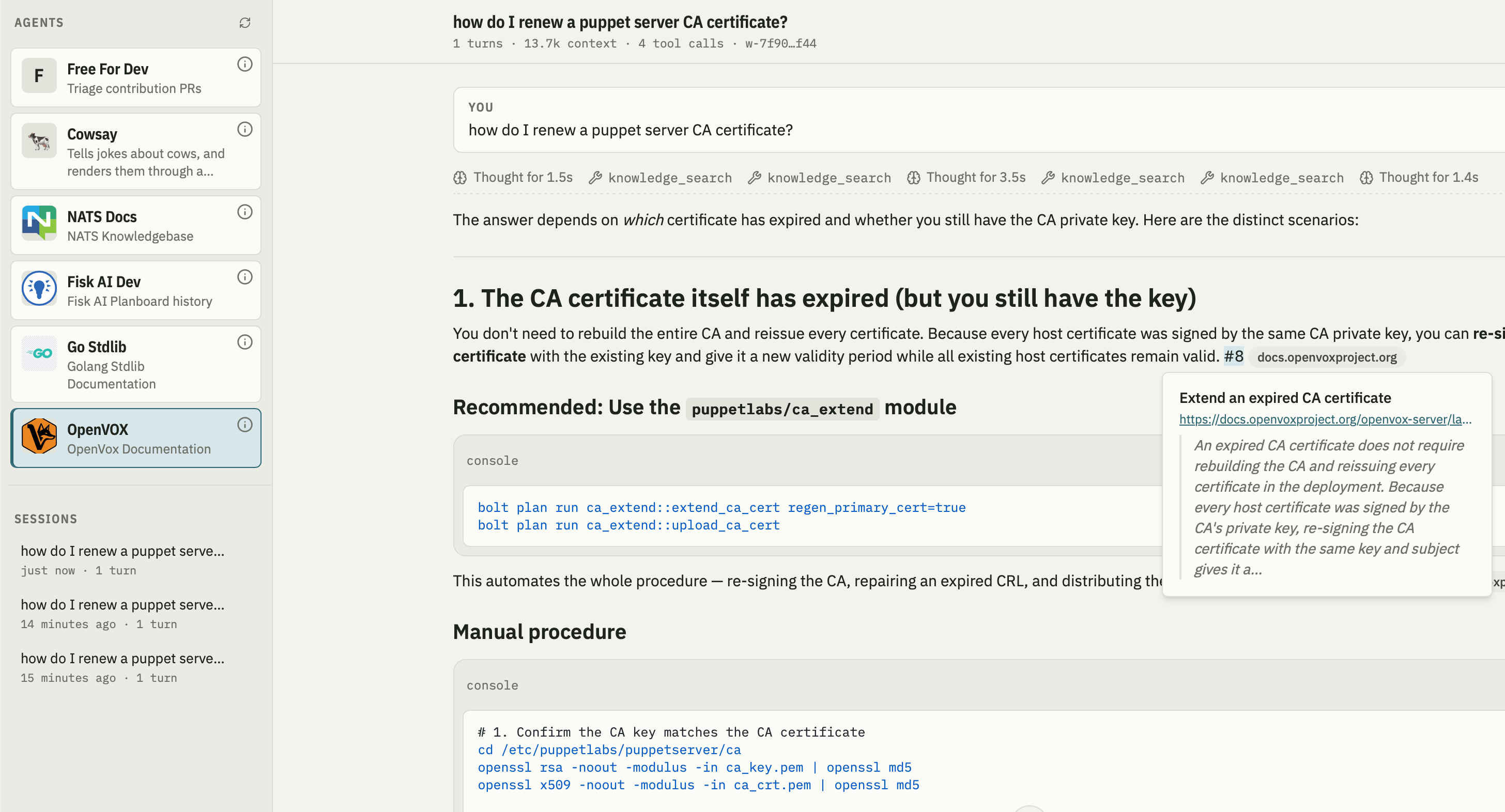
Fisk Web Interface

When running in the web frontend we can see on the left many agents each with a unique but limited ability. We see the agent answering a question grounded in the documentation including citations that take you direct to the website. While I was using a hosted model here via Open Router you would get very good results from even a small local LLM like the 8B Qwen models - runnable on most modern laptops.

This is the start of a series of posts that discuss how I designed the components of this system in mid 2026, starting first with what a Harness is.

Read on to the full entry for that.

[]
ai  choria  fisk 

Choria Hierarchical Data

As most are aware, I created the widely used Hiera system in Puppet. I introduced it in 2011, and it has since become essentially the only way to use Puppet in any meaningful fashion. Given its widespread adoption, I donated the code to Puppet, and it became integrated with Puppet core.

Unfortunately, during this integration we lost some key values—the command line and the ability to use it in scripts and elsewhere.

Meanwhile, our world is changing, and we are ever more focussing on small, single purpose compute. I intend to create a new kind of Configuration Management system that is focussed on the small, single, purpose needs. Filling the gap that has always existed - how to manage our applications rather than systems, an area Puppet has always been weak at.

There is then still the need for hierarchical data and given that I have the flexibility to start completely fresh I am at best taking some inspiration from Hiera.

So today I’ll introduce a new tool called Choria Hierarchical Data - current code name tinyhiera but that might change.

NOTE This post was first posted on the Choria blog.

Read on for the details

[]