I recently released an AI Harness called Fisk AI and I want to do a series of posts on how the major components is designed. There’s a lot of mystery around Agent Harnesses, but really it is not magic or particular hard, it’s a different paradigm that enables some novel new behaviors, but ultimately it’s just an API client.
The purpose and background of the Fisk harness is best captured by the project announcement post, but, in short, it’s a harness that lets you use LLMs in a safe and constrained manner. Rather than all-powerful agents like Claude, Codex, Hermes etc I want to assemble an agent by starting with nothing and adding to it what I need via tools, guardrails and limits. In the end giving me complete visibility in what it can do in order to make it safe, secure, privacy respecting and potentially local only.
To build an agent you need no code at all, just a YAML file, like this one that lets me build an agent that can answer questions about OpenVox. Here is a slightly longer than typical example that creates a full chat experience where you are essentially talking with https://docs.openvoxproject.org. You get discussion grounded in documentation with full citations of every source linking directly back to the source material on the OpenVox website.
identity: OpenVOX
icon_url:  https://raw.githubusercontent.com/voxpupuli/logos/refs/heads/master/images/OpenVox/Sticker/HexagonSticker.svg

harness:
  knowledge:
    enabled: true
    expand_to_section: true
    read_tool: true
    paths:
      - openvox-docs/docs/_openvox_8x
      - openvox-docs/docs/_openvox-server_8x
      - puppet-specifications/language
      - types.md
    citations:
      - pattern: '^openvox-docs/docs/_openvox_8x/(.+).(markdown|md)$'
        replace: 'https://docs.openvoxproject.org/openvox/latest/$1.html#${anchor}'
      - pattern: '^openvox-docs/docs/_openvox-server_8x/(.+).(markdown|md)$'
        replace: 'https://docs.openvoxproject.org/openvox-server/latest/$1.html#${anchor}'

llm:
  model: deepseek/deepseek-v4-flash
  budget:
    max_tokens: 100000
    max_iterations: 50

system_prompt: |
  You help users based on a knowledge base of OpenVox information

  Every answer must be researched using the RESEARCH STRATEGY, presented using RESPONSE FORMAT and validated using
  RESPONSE CHECKLIST.

  RESEARCH STRATEGY:
  - Use must use `knowledge_search` tool to find the direct answer
  - For broad topics, always perform at least 2-3 searches with different keyword angles to ensure comprehensive coverage

  OUTPUT FORMATS:
  - The target output is Markdown.
  - You can generate SVG images, display them in a code block with the language `svg`
  - You can make mermaid diagrams in code blocks with language `mermaid`

  RESPONSE FORMAT:

  Show citations to sources in the paragraph text in the form `(#ref)` or `(#ref)(#ref)` so that users know exactly where the
  information comes from. Citations may only include entries from `knowledge_search`. Citations matching the
  `ref` in the `knowledge_search` output.
Here I create a knowledge base that can answer questions about OpenVox by simply ingesting their documentation git repository. This is the sweet spot for this tool - just quickly assemble an agent that can bring some agentic abilities to your exiting files.
Here I use only Full Text Search and BM25 so it would work well without a local embeddings model - but you can opt into that if needed.
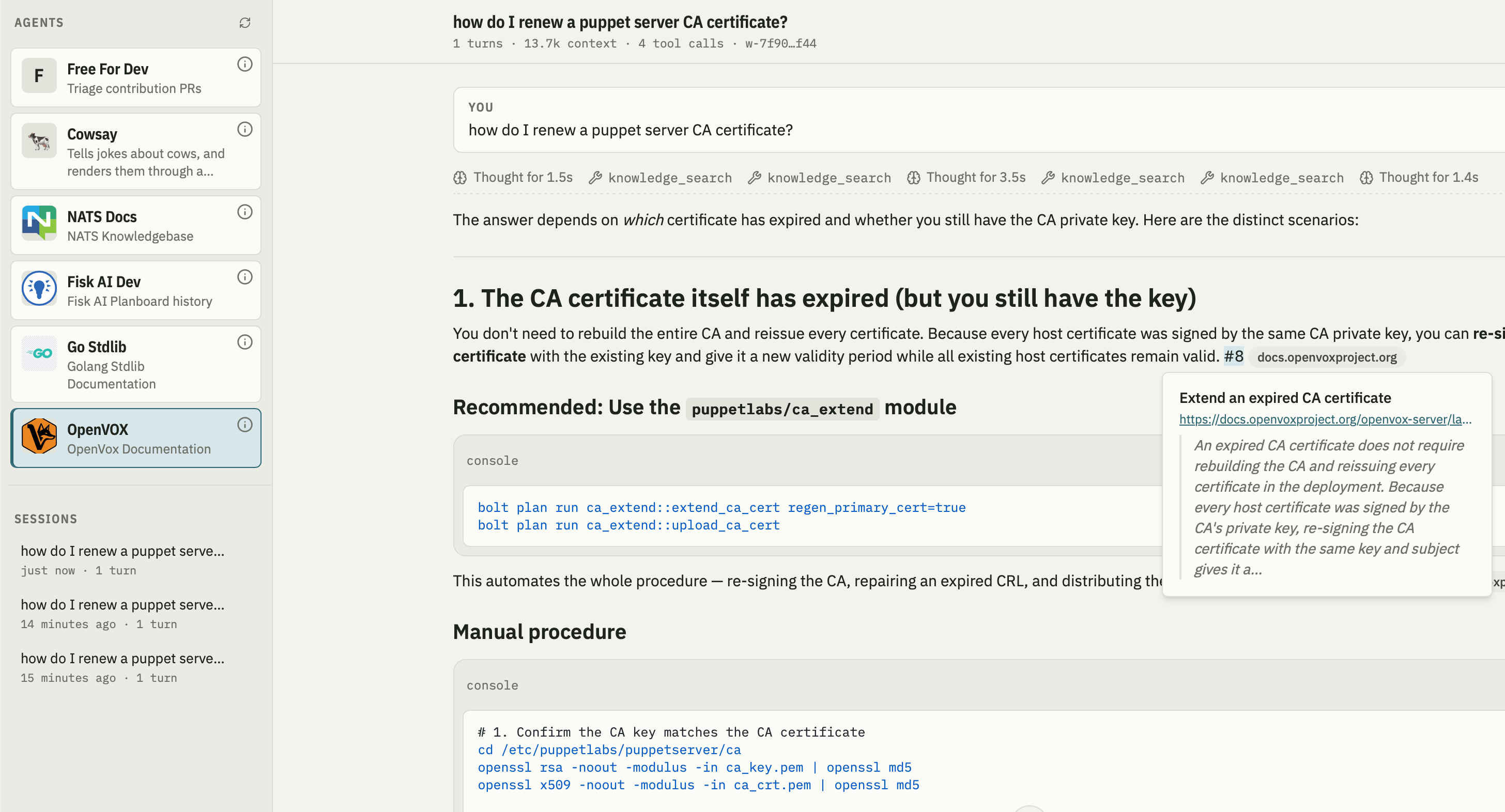
When running in the web frontend we can see on the left many agents each with a unique but limited ability. We see the agent answering a question grounded in the documentation including citations that take you direct to the website. While I was using a hosted model here via Open Router you would get very good results from even a small local LLM like the 8B Qwen models - runnable on most modern laptops.
This is the start of a series of posts that discuss how I designed the components of this system in mid 2026, starting first with what a Harness is.
Read on to the full entry for that.
What is an AI Harness
A Large Language Model is basically going to just take text in and produce text output (ignoring vision, audio etc models now). You give them a piece of work, and it gives you the answer. Answers can potentially be made up of multiple parts such as when its showing you its reasoning. But ultimately that’s the entire thing, you just loop over questions and answers.
A harness is the thing that connects your computer to the LLM and drives this API interaction, here’s a very basic AI harness:
package main

import (
	"context"
	"fmt"
	"log"

	"github.com/anthropics/anthropic-sdk-go"
)

func main() {
	client := anthropic.NewClient() // reads ANTHROPIC_API_KEY

	resp, err := client.Messages.New(context.Background(), anthropic.MessageNewParams{
		Model:     "claude-opus-5",
		MaxTokens: 1024,
		Messages: []anthropic.MessageParam{
			anthropic.NewUserMessage(anthropic.NewTextBlock("what is 1+1")),
		},
	})
	if err != nil {
		log.Fatal(err)
	}

	for _, block := range resp.Content {
		if text, ok := block.AsAny().(anthropic.TextBlock); ok {
			fmt.Println(text.Text)
		}
	}
}
$ go run cmd/main.go
**1 + 1 = 2**

Let me know if you have any other questions!
You run the command, it gets an answer, that’s the entire thing done. It’s not magic you’re just calling an API.
Now LLMs that cannot reach the outside world, or do not know about your environment or problem domain is going to be quite limited and useless.
This is where the Harness adds a lot of value by giving the LLM capabilities around its core loop:
- Provide tools the model can call like closing a GitHub PR
- Provide Memory the LLM can read and write on demand
- Access to documentation via Retrieval APIs
- Ability to connect user interfaces such as CLI, TUI, Web or Slack
- Session recording to facilitate crash recovery or horizontal scaling
- Communication protocols
- Integration with identity systems
So the harness really is just a fat API client that expose callable endpoints as tools - these tools are used to solve many problems like MCP, Skills, RAG, etc.
The Fisk AI Harness is designed to be horizontally scalable, runnable on the network and communicate with users over many platforms. It’s pluggable, identity aware and can be used to run large AI platform backends - despite presenting to typical end uses as a single binary TUI or web based program.
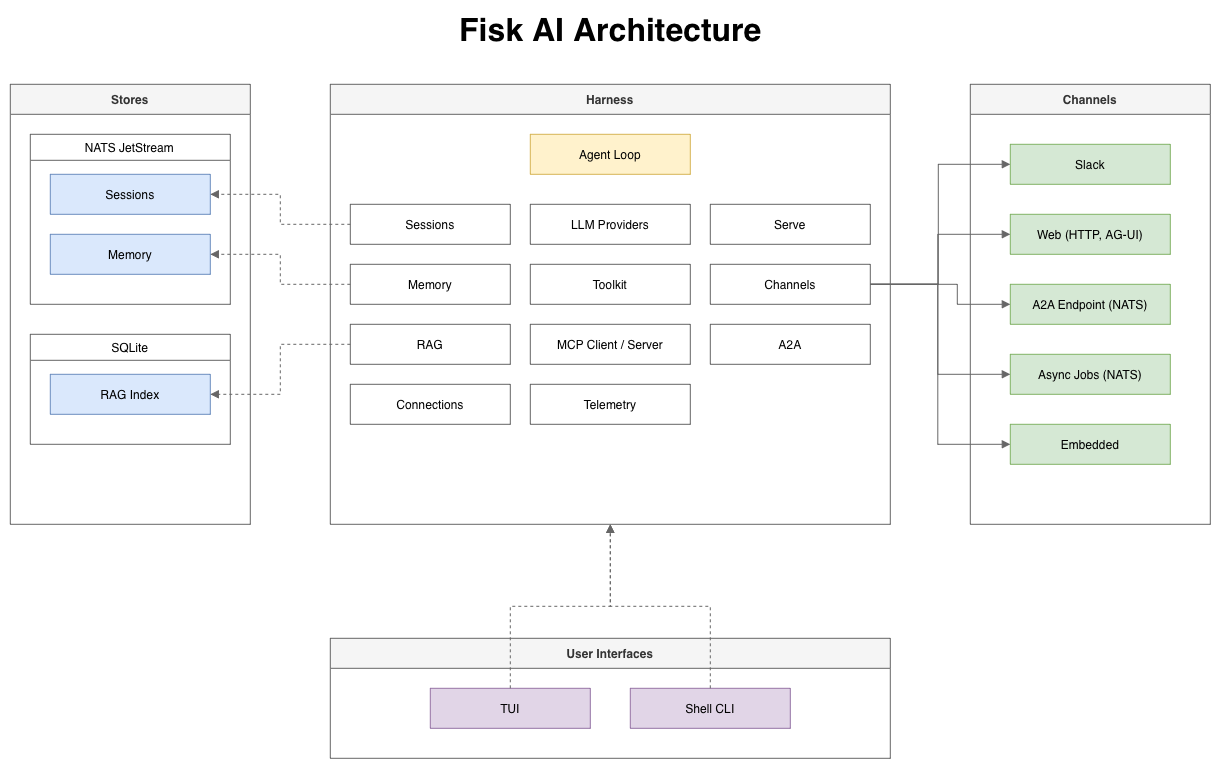
In this series of posts I’ll look into how most of these components are designed and how it glues together to provide context, knowledge, tools, memory, output channels, MCP and other typical AI agent features.
Posts in this series
- Tool Calling with a companion video
- Agentic Loop with a companion video