In my previous post I covered the topic of Tool Calling. In that post I kind of jumped ahead in the Harness topic skipping over the actual loop the tools plug into.
I did that on purpose, I wanted to show that arguably the most important capabilities of the harness are all provided by something we’ve all been doing for decades - a simple callback handler. I wanted to demystify the topic a bit and show that quite simple primitives unlocks a lot of capability.
This does beg the question: Why if this is such a simple thing did I feel the need to devote 3,000 words to that one topic?
The reason is that we are working with exceptionally constrained resources. The context is finite and inefficient.
- The Context is small, the 1M token contexts of the frontier models are an absolute luxury, I often run my constrained Agents with 32K tokens or smaller contexts.
- The entire system is stateless requiring the harness to manage it. No help is coming, managing this resource is 100% up to the harness.
Most of us have either forgotten what it means to compute in constrained resources or were born in a time of abundant CPU or Memory resources.
It is these limitations that makes it necessary to manage the cache, perform progressive disclosure, do compactions and countless other techniques - that’s where the complexity lives.
If we had infinite contexts there would be no need for a lot of what we call breakthroughs in AI - no need for complex RAG systems, no need for progressively disclosed skills, no need for complex tool management etc.
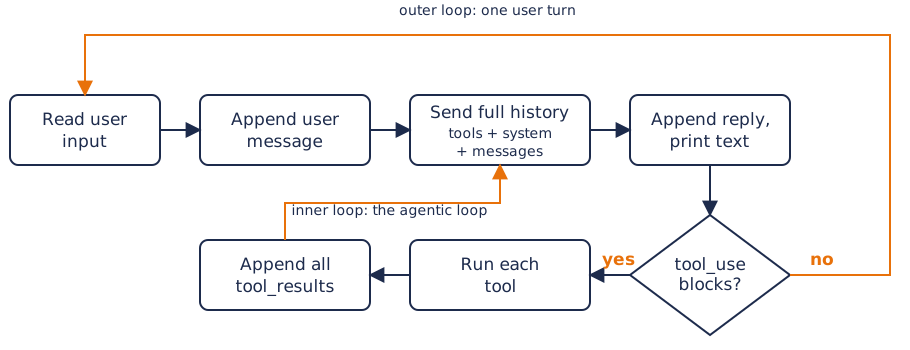
So let’s start at the basics, we build a simple agent loop that will allow you to keep querying the agent in turn after turn.
Here is our earlier example made slightly more complex:
 1func main() {
 2	client := anthropic.NewClient() // reads ANTHROPIC_API_KEY
 3
 4	params := anthropic.MessageNewParams{
 5		Model:     "claude-opus-5",
 6		MaxTokens: 1024,
 7		System: []anthropic.TextBlockParam{
 8			{Text: "You are a terse assistant. Answer in one sentence."},
 9		},
10	}
11
12	in := bufio.NewScanner(os.Stdin)
13	for {
14		fmt.Print("> ")
15		if !in.Scan() {
16			return // ctrl-d or ctrl-c
17		}
18
19		params.Messages = append(params.Messages, anthropic.NewUserMessage(anthropic.NewTextBlock(in.Text())))
20
21		resp, err := client.Messages.New(context.Background(), params)
22		if err != nil {
23			log.Fatal(err)
24		}
25
26		params.Messages = append(params.Messages, resp.ToParam())
27
28		for _, block := range resp.Content {
29			if text, ok := block.AsAny().(anthropic.TextBlock); ok {
30				fmt.Println(text.Text)
31			}
32		}
33	}
34}
When I run this I can chat with the agent and ask it anything I want, and it will give me one sentence answers:
$ go run cmd/main.go
> What is answer to life, the universe and everything?
42 — per Douglas Adams' *The Hitchhiker's Guide to the Galaxy*,
though the actual question remains unknown.

> Pick a random number between 1 and a 100
73
Read the full entry for the rest of this discussion.
Companion Video
If video format is more your thing there is a companion video on my YouTube Channel.
Context Snowball
If you look at this loop you can see something really alarming happening here, we are appending to a list and it will grow forever.
19params.Messages = append(params.Messages, anthropic.NewUserMessage(anthropic.NewTextBlock(in.Text())))
20
21resp, err := client.Messages.New(context.Background(), params)
22if err != nil {
23	log.Fatal(err)
24}
25
26params.Messages = append(params.Messages, resp.ToParam())
This is the Context window, every message, every response, always growing, always eating into your 32K token total context.
And it was already not empty to start with because the initial prompt You are a terse assistant. Answer in one sentence. was already in there.
Eventually the snowball is just too large, the prompt exceeds backend limits and the session terminates with an error.
Adding in a Tool
Let’s add a single echo tool:
 1func main() {
 2   client := anthropic.NewClient() // reads ANTHROPIC_API_KEY
 3
 4   params := anthropic.MessageNewParams{
 5      Model:     "claude-opus-5",
 6      MaxTokens: 1024,
 7      System: []anthropic.TextBlockParam{
 8         {Text: "You are a terse assistant. Answer in one sentence."},
 9      },
10      Tools: []anthropic.ToolUnionParam{{OfTool: &anthropic.ToolParam{
11         Name:        "echo",
12         Description: anthropic.String("Echoes the given text back"),
13         InputSchema: anthropic.ToolInputSchemaParam{
14            Properties: map[string]any{"text": map[string]any{"type": "string"}},
15            Required:   []string{"text"},
16         },
17      }}},
18   }
19
20   in := bufio.NewScanner(os.Stdin)
21   for {
22      fmt.Print("> ")
23      if !in.Scan() {
24         return // ctrl-d or ctrl-c
25      }
26
27      params.Messages = append(params.Messages, anthropic.NewUserMessage(anthropic.NewTextBlock(in.Text())))
28
29      for {
30         resp, err := client.Messages.New(context.Background(), params)
31         if err != nil {
32            log.Fatal(err)
33         }
34         params.Messages = append(params.Messages, resp.ToParam())
35
36         var results []anthropic.ContentBlockParamUnion
37         for _, block := range resp.Content {
38            switch b := block.AsAny().(type) {
39            case anthropic.TextBlock:
40               fmt.Println(b.Text)
41            case anthropic.ToolUseBlock:
42               switch b.Name {
43               case "echo":
44                  var in struct{ Text string `json:"text"` }
45                  json.Unmarshal(b.Input, &in)
46                  fmt.Println("[tool] echo:", in.Text)
47                  results = append(results, anthropic.NewToolResultBlock(b.ID, in.Text, false))
48               default:
49                  results = append(results, anthropic.NewToolResultBlock(b.ID, "unknown tool "+b.Name, true))
50               }
51            }
52         }
53
54         if len(results) == 0 {
55            break // no tool calls, Claude is done with this turn
56         }
57         params.Messages = append(params.Messages, anthropic.NewUserMessage(results...))
58      }
59   }
60}
Things to note:
- Line 10: We are adding a list of Tools, for now just an
echotool - Line 38: We now check the block types: print
TextBlocksand we handleToolUseBlockchecking which function to invoke - Line 44: We invoke the
echobody
If we run this we see:
$ go run cmd/main.go
> echo hello world back to me
I'll echo that for you.
[tool] echo: hello world
There you go — the echo came back with: **hello world**
>
To really see just how it works - and how inefficiently it works! - let’s dump the raw HTTP traffic by injecting a logging middleware into the client:
 2client := anthropic.NewClient(option.WithMiddleware(
 3	func(req *http.Request, next option.MiddlewareNext) (*http.Response, error) {
 4        body, _ := io.ReadAll(req.Body)
 5        fmt.Println(">>>", string(body))
 6        req.Body = io.NopCloser(bytes.NewReader(body))
 7
 8        resp, err := next(req)
 9        if err != nil {
10            return nil, err
11        }
12
13        body, _ = io.ReadAll(resp.Body)
14        fmt.Println("<<<", string(body))
15        resp.Body = io.NopCloser(bytes.NewReader(body))
16        return resp, nil
17}))
Now when I run the above conversation again we see the following network traffic between the harness and the model provider (here OpenRouter in Anthropic compatible mode)
 1{
 2   "max_tokens": 1024,
 3   "messages": [
 4      {
 5         "content": [
 6            {
 7               "text": "echo hello world back to me",
 8               "type": "text"
 9            }
10         ],
11         "role": "user"
12      }
13   ],
14   "model": "claude-opus-5",
15   "system": [
16      {
17         "text": "You are a terse assistant. Answer in one sentence.",
18         "type": "text"
19      }
20   ],
21   "tools": [
22      {
23         "input_schema": {
24            "properties": {
25               "text": {
26                  "type": "string"
27               }
28            },
29            "required": [
30               "text"
31            ],
32            "type": "object"
33         },
34         "name": "echo",
35         "description": "Echoes the given text back"
36      }
37   ]
38}
To note:
- line 3: Our actual message
- line 15: The system prompt
- line 21: Every defined tool schema, description etc
Not too bad so far kind of cleanly maps to the code. Now let’s see the response:
 1{
 2  "id": "gen-1789843591-n6kfV10Jg42uybEky42W",
 3  "type": "message",
 4  "role": "assistant",
 5  "container": null,
 6  "content": [
 7    {
 8      "type": "text",
 9      "text": "I'll echo that for you.",
10      "citations": []
11    },
12    {
13      "type": "tool_use",
14      "id": "toolu_01EfM2Y9PfGGD9PCgZQXPeQC",
15      "caller": {
16        "type": "direct"
17      },
18      "name": "echo",
19      "input": {
20        "text": "hello world"
21      }
22    }
23  ],
24  "model": "anthropic/claude-opus-5",
25  "stop_reason": "tool_use",
26  "stop_details": null,
27  "stop_sequence": null,
28  "usage": {},
29  "context_management": null,
30  "provider": "Claude Platform on AWS"
31}
I removed like 10 lines of usage stats here to keep things short - you would use those for accounting, billing tracking etc - the important parts here are:
- Line 7: a message to the user
- Line 12: Invoking the tool as shown in the previous post
- Line 25: We stopped on
tool_userather thanend_turnmeaning the turn continues after the tool results
So at this point the harness interpreted the type: tool_use and called the echo tool based on name. As the
code stands it will call all tool_use invocations and then send a single response:
 1{
 2   "max_tokens": 1024,
 3   "messages": [
 4      {
 5         "content": [
 6            {
 7               "text": "echo hello world back to me",
 8               "type": "text"
 9            }
10         ],
11         "role": "user"
12      },
13      {
14         "content": [
15            {
16               "text": "I'll echo that for you.",
17               "citations": [],
18               "type": "text"
19            },
20            {
21               "id": "toolu_01EfM2Y9PfGGD9PCgZQXPeQC",
22               "input": {
23                  "text": "hello world"
24               },
25               "name": "echo",
26               "caller": {
27                  "type": "direct"
28               },
29               "type": "tool_use"
30            }
31         ],
32         "role": "assistant"
33      },
34      {
35         "content": [
36            {
37               "tool_use_id": "toolu_01EfM2Y9PfGGD9PCgZQXPeQC",
38               "is_error": false,
39               "content": [
40                  {
41                     "text": "hello world",
42                     "type": "text"
43                  }
44               ],
45               "type": "tool_result"
46            }
47         ],
48         "role": "user"
49      }
50   ],
51   "model": "claude-opus-5",
52   "system": [
53      {
54         "text": "You are a terse assistant. Answer in one sentence.",
55         "type": "text"
56      }
57   ],
58   "tools": [
59      {
60         "input_schema": {
61            "properties": {
62               "text": {
63                  "type": "string"
64               }
65            },
66            "required": [
67               "text"
68            ],
69            "type": "object"
70         },
71         "name": "echo",
72         "description": "Echoes the given text back"
73      }
74   ]
75}
Here we see:
- Line 3: the
messagesI pointed out earlier is getting all the appends to it - Line 5: the very first message again
- Line 13: the models previous message including the previous invocation of the tool
- Line 34: the tool result for call ID
toolu_01EfM2Y9PfGGD9PCgZQXPeQCoftype: tool_result - Line 52: the system prompt again
- Line 58: all the tools again
And so it goes, ever-growing. Every turn you send THE ENTIRE HISTORY back to the model, and it sends you back either instructions for continuation or thinking, answers etc.
You then send the entire conversation again verbatim.
This means when you are at 500K token context in your Claude Code session, and you say thank you that will cost you
500K token of network traffic (roughly 2MB JSON), the LLM has to parse all the turns that came before, every tool call,
every result, all the tool specs and system prompt. And then it says you are welcome. Incredibly wasteful and on
every turn our finite resource is being consumed rather rapidly.
Cost growth is quadratic with turn count without a cache. With a cache reads are ~0.1× input price, writes 1.25× to 2×.
Caching
At the model provider they will employ various things to cache the conversation processing. This phase is called the pre-fill phase, and it’s output gets cached in large scale hyperefficient Key Value stores.
And surprisingly it is not on by default in some cases and worse it even only kicks in after some threshold is reached like a few thousand tokens AND it is only going to cache on 5 minutes TTL basis! So if you go off to have a coffee you come back to an empty cache.
There are various cache timings and some modern providers even cold store caches for extended period for some workloads. Generally though you will see a quite short cache TTL.
This is how you would enable it:
params := anthropic.MessageNewParams{
    Model:        "claude-opus-5",
    MaxTokens:    1024,
    CacheControl: anthropic.NewCacheControlEphemeralParam(),
    Tools:        ...,
}
Caching is prefix-matched. Any byte change in tools or system invalidates everything after it, so tool lists must be stable, and nothing volatile (timestamps) belongs in the system prompt. For a harness author this is the constraint why parts send before the System Prompt must remain stable.
Stateless Protocol
So this all seems like quite a bad way to build software systems. It implies that there is no state kept at the provider, and it is all up to the harness to manage - this is correct until caching is enabled.
There isn’t some magical techno genie waiting for you to finish your coffee hogging a GPU, the system is designed to enter a GPU, do the inference work and free it up ASAP for the next persons work.
Without caching when you do your next turn you will almost certainly land on a different GPU, in a different compute unit, in a different rack and maybe even in a different data center on a different continent. With caching, they will do cache affinity ensuring your follow-up requests lands near the cache.
The statelessness makes a lot of this possible at the scale the inference systems need. The stateless nature is what drives a lot of the limitations and sometimes somewhat strange ways to apply tools to techniques.
It also though enables a lot, we will see later when we talk about session crash recovery that directly due to the stateless nature and client-driven assembly of history that workloads can be durable, migrated, crash recovered and more - without redoing work that was already done in that past.
Omissions in the examples
These are quite simple examples to convey the ideas, there are some significant omissions here in my examples that I wanted to call out:
- The inner for loop will run forever, every turn costing you money and worse this is driven by the LLM. Smaller LLMs can get trapped in a reasoning loop where they will just do turn-after-turn, each one costing you money. Every real harness has turn and token budgets.
- We do not check the
stop_reason: max_tokensand the tool runs anyway, but the input could have been cut in half by the token use limiter. I kept the demonstration code short but this is a significant shortcoming.
Conclusion
I think that’s about enough of this topic at this point, you now know where to plug the concepts of the previous post into an actual harness and have real working code ready to answer important questions.
We’ll revisit the loop a lot during the following posts so expect to see some of this code again in the future. If you intend to experiment along with these posts it is worth trying the examples I showed above.
I also hope you have a bit of feel for the inefficiencies involved, the cost of being stateless and the intricacies of the caching layers - it is a lot of moving parts to get right!
Harness design and the many patterns, limitations and complexities around tools that I touched on in the previous post is where the innovation lies. In single use harnesses like Fisk I have it quite easy (relatively speaking!) but if you consider something like Claude Code or Codex you can see this presents a very significant challenge and that the harness can play a huge role in overall efficacy of the outcomes LLMs produce.
This is part of a series of posts about Harness design, the first post is AI Harness Design Series.s