by R.I. Pienaar | Sep 11, 2009 | Front Page
Previously I posted a quick bit of information about Puppet 0.25 upgrade and how it sped up file transfers, below some more information.
First some metrics from the puppetmaster before and after, this particular master handles around 50 clients on a 30 minute interval. The master is a Mongrel + Apache master with 4 worker processes running on a 64bit CentOS 5.3 VM with 1GB RAM
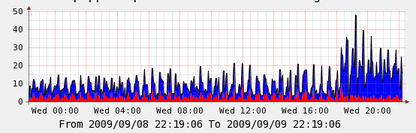
First the CPU graph, blue is user time red is system time:
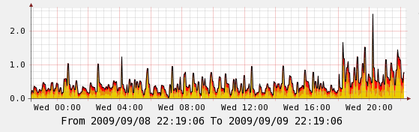
The next is Load Average, it’s a stack of 5, 10 and 15 minute averages:
And finally here is a bandwidth of the master blue is outbound and green is incoming:
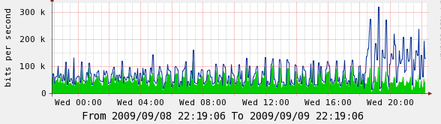
So this is the master, it’s very interesting that the master is a lot busier than before, even with just 50 nodes this is a significant CPU increase, I do not know how this will map to say 500 or 600 nodes but I think larger sites will want to be pretty careful about updating a large chunk of machines without testing the impact.
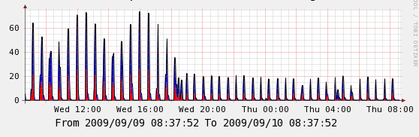
Finally here is a graph from a node, the node has 450 file resources and doesn’t do anything but run Puppet all day – at night in this graph for a short period it did backups after that it idled again. In this case combined with the massive drop in run time the cpu time is also way down, I think this is a massive win – you can always add more masters easily but suffering on all your nodes under puppetd is pretty bad. This on its own for me is a pretty big win for upgrading to Puppet 0.25.
This graph is obviously taken some hours later but it’s the same basic scale.
I did not see a noticeable change in memory profile on either master of nodes so no graphs included here for that.
Overall I think this is a big win, but be careful of what happens on your masters when you upgrade.
by R.I. Pienaar | Sep 9, 2009 | Front Page
Reductive Labs released version 0.25.0 of Puppet recently, there are some teething problems but I got most of it sorted out by upgrading Mongrel.
Today I decided to upgrade 60 of my nodes and they’ve slowly been running in a for loop all day, the results on machines with many file resources are staggering.
One node that uses snippets heavily has 450 file resources and used to take a while to run, here’s some before and after stats:
Finished catalog run in 235.63 seconds
Finished catalog run in 231.43 seconds
Finished catalog run in 42.74 seconds
Finished catalog run in 32.14 seconds
Very impressed.
by R.I. Pienaar | Sep 1, 2009 | Front Page
I did a fresh install of Snow Leopard on my Macbook and soon realized my Samba shares were broken through finder – but still worked from the CLI.
Worse still once I tried to access the shares Finder would basically be dead, you’d need to Force Quit it to make it work again.
Eventually I reached for tcpdump and wireshark and found it’s the pesky .DS_Store files again, seems my QNAP is denying access to them, Finder did not cope well with this.
A quick bit of hackery of my smb.conf solved it:
veto files = /.AppleDB/.AppleDouble/.AppleDesktop/.DS_Store/:2eDS_Store/Network Trash Folder/Temporary Items/TheVolumeSettingsFolder/.@__thumb/.@__desc/
delete veto files = yes
Once I got this removed and samba restarted my shares were working again in Snow Leopard. A bit annoying but not too hard in the end.
by R.I. Pienaar | Aug 31, 2009 | Code, Front Page
Often while writing Puppet manifests you find yourself needing data, things like the local resolver, SMTP relay, SNMP Contact, Root Aliases etc. once you start thinking about it the amount of data you deal with is quite staggering.
It’s strange then that Puppet provides no way to work with this in a flexible way. By flexible I mean:
- A way to easily retrieve it
- A way to choose data per host, domain, location, data center or any other criteria you could possibly wish
- A way to provide defaults that allow your code to degrade gracefully
- A way to make it a critical error should expected data not exist
- A way that works with LDAP nodes, External Nodes or normal node{} blocks
This is quite a list of requirements, and in vanilla puppet you’d need to use case statements, if statements etc.
For example, here’s a use case, set SNMP Contact and root user alias. Some machines for a specific client should have different contact details than other, indeed even some machines should have different contact details. There should be a fall back default value should nothing be set specifically for a host.
You might attempt to do this with case and if statements:
class snmp::config {
   if $fqdn == "some.box.your.com" {
      $contactname = "Foo Sysadmin"
      $contactemail = "sysadmin@foo.com"
   }

   if $domain == "bar.com" {
      $contactname = "Bar Sysadmin"
      $contactemail = "sysadmin@bar.com"
   }

   if $location == "ldn_dc" && (! $contactname && ! $contactemail) {
      $contactname = "London Sysadmin"
      $contactemail = "ldnops@your.com"
   }

   if (! $contactname && ! $contactemail) {
      $contactname = "Sysadmin"
      $contactemail = "sysadmin@you.com"
   }
} |
class snmp::config {
if $fqdn == "some.box.your.com" {
$contactname = "Foo Sysadmin"
$contactemail = "sysadmin@foo.com"
}
if $domain == "bar.com" {
$contactname = "Bar Sysadmin"
$contactemail = "sysadmin@bar.com"
}
if $location == "ldn_dc" && (! $contactname && ! $contactemail) {
$contactname = "London Sysadmin"
$contactemail = "ldnops@your.com"
}
if (! $contactname && ! $contactemail) {
$contactname = "Sysadmin"
$contactemail = "sysadmin@you.com"
}
}
You can see that this might work, but it’s very unwieldy and your data is all over the code and soon enough you’ll be nesting selectors in case statements inside if statements, it’s totally unwieldy not to mention not reusable throughout your code.
Not only is it unwieldy but if you wish to add more specifics in the future you will need to use tools like grep, find etc to find all the cases in your code where you use this and update them all. You could of course come up with one file that contains all this logic but it would be aweful, I’ve tried it’s not viable.
What we really want to do is just this, and it should take care of all the code above, you should be able to call this wherever you want with complete disregard for the specifics of the overrides in data:
$contactname = extlookup("contactname")
$contactemail = extlookup("contactemail") |
$contactname = extlookup("contactname")
$contactemail = extlookup("contactemail")
I’ve battled for ages with ways to deal with this and have come up with something that fits the bill perfectly, been using it and promoting it for almost a year now and so far found it to be totally life saver.
Sticking with the example above, first we should configure a lookup order that will work for us, here is my actual use:
$extlookup_precedence = ["%{fqdn}", "location_%{location}", "domain_%{domain}", "country_%{country}", "common"] |
$extlookup_precedence = ["%{fqdn}", "location_%{location}", "domain_%{domain}", "country_%{country}", "common"]
This sets up the lookup code to first look for data specified for the host, then the location the host is hosted at, then the domain, country and eventually a set of defaults.
My current version of this code uses CSV files to store the data simply because it was convenient and universally available with no barrier to entry. It would be trivial to extend the code to use a database, LDAP or other system like that.
For my example if I put into the file some.box.your.com.csv the following:
contactemail,sysadmin@foo.com
contactname,Foo Sysadmin |
contactemail,sysadmin@foo.com
contactname,Foo Sysadmin
And in common.csv if I put:
contactemail,sysadmin@you.com
contactname,Sysadmin |
contactemail,sysadmin@you.com
contactname,Sysadmin
The lookup code will use this data whenever extlookup(“contactemail”) gets called on that machine, but will use the default when called from other hosts. If you follow the logic above you’ll see this completely replace the case statement above with simple data files.
Using a system like this you can model all your data needs and deal with the data and your location, machine, domain etc specific data outside of your manifests.
The code is very flexible, you can reuse existing variables in your code inside your data, for example:
ntpservers,1.pool.%{country}.ntp.org,2.pool.%{country}.ntp.org |
ntpservers,1.pool.%{country}.ntp.org,2.pool.%{country}.ntp.org
In this case if you have $country defined in your manifest the code will use this variable and put it into the answer. This snippet of data also shows that it supports arrays.
Here is another use case:
package{"screen":
   ensure => extlookup("pkg_screen", "absent")
} |
package{"screen":
ensure => extlookup("pkg_screen", "absent")
}
This code will ensure that, unless otherwise specified, I do not want to have screen installed on any of my servers. I could now though decide that all machines in a domain, or all machines in a location, country or specific hosts could have screen installed by simply setting them to present in the data file.
This makes the code not only configurable but configurable in a way that suits every possible case as it depends on the precedence defined above. If your use case does not rely on countries for example you can just replace the country ordering with whatever works for you.
I use this code in all my manifests and it’s helped me to make an extremely configurable set of manifests. It has proven to be very flexible as I can use the same code for different clients in different industries and with different needs and network layouts without changing the code.
The code as it stands is available here: http://www.devco.net/code/extlookup.rb
Follow the comments in the script for install instructions and full usage guides.
by R.I. Pienaar | Aug 31, 2009 | Code, Front Page
Yesterday I released version 0.4 of my Ruby PowerDNS development framework.
Version 0.3 was a feature complete version but lacked in some decent error handling in all cases which resulted in weird unexplained crashes when things didn’t work as hoped, for example syntax errors in records could kill the whole thing.
Version 0.4 is a big push in stability, I’ve added tons of exception handling there should now be very few cases of unexpected terminations, I know of only one case and that’s when the log can’t be written too, all other cases should be logged and recovered from in some hopefully sane way.
I’ve written loads of unit tests using Test::Unit and have created a little testing harness that can be used to test your records without putting them on the server, using this for example you can test GeoIP based records easily since you can specify any source address.
Overall I think this is a production ready release, it would be a 1.0 release was it not for some features I wish to add before calling it 1.0. The features are about logging stats and about consuming data from external sources, these will be my next priorities.
by R.I. Pienaar | Aug 19, 2009 | Code, Front Page, Usefull Things
We often have people asking ‘will this work…’ or ‘how do I…’ type questions on IRC, usually because it seems like such a big deal to upload a bit of code to your master just to test.
Here are a quick few tips and tricks for testing out bits of puppet code to get the feel for things, I’ll show you how to test code without using your puppetmaster or needing root, so it’s ideal for just playing around on your shell, exploring the language structure and syntax..
Getting more info
Most people know this one, but just running puppetd –test will highlight all the various steps puppet is taking, any actions its
performing etc in a nice colored display, handy to just do one-offs and see what is happening.
Testing small bits of code:
Often you’re not sure if you’ve got the right syntax, especially for case statements, selectors and such, or you just want to test out some scenarios, you can’t just dump the stuff into your master because it might not even compile.
Puppet comes with a executable called ‘puppet’ that’s perfect for this task, simply puppet some manifest into a file called test.pp and run it:
puppet --debug --verbose test.pp |
puppet --debug --verbose test.pp
This will run through your code in test.pp and execute it. You should be aware that you couldn’t fetch files from the master in this case since it’s purely local but see the File types reference for a explanation of how the behavior changes – you can still copy files, just not from the master.
You can do anything that puppet code can do, make classes, do defines, make sub classes, install packages, this is great for testing out small concepts in a safe way. Everything you see in this article was done in my shell like this.
What is the value of a variable?
You’ve set a variable in some class but you’re not sure if it’s set to what you’re expecting, maybe you don’t know the scoping rules just yet or you just want to log some state back to the node or master log.
In a usual scripting language you’d add some debug prints, puppet is the same. You can print simple values in the master log by doing this in your manifest:
notice("The value is: ${yourvar}") |
notice("The value is: ${yourvar}")
Now when you run your node you should see this being printed to the syslog (by default) on your master.
To log something to your client, do this:
notify{"The value is: ${yourvar}": } |
notify{"The value is: ${yourvar}": }
Now your puppet logs – syslog usually – will show lines on the client or you could just do puppetd –test on the client to see it run and see your debug bits.
What is in an array?
You’ve made an array, maybe from some external function, you want to know what is in it? This really is an extension to the above hint that would print garbage when passed arrays.
Building on the example above and the fact that puppet loops using resources, lets make a simple defined type that prints each member of an array out to either the master or the client (use the technique above to choose)
$arr = [1, 2, 3]

define print() {
   notice("The value is: '${name}'")
}

print{$arr: } |
$arr = [1, 2, 3]
define print() {
notice("The value is: '${name}'")
}
print{$arr: }
This will print one line for each member in the array – or just one if $arr isn’t an array at all.
$ puppet test.pp
notice: Scope(Print[1]): The value is: '1'
notice: Scope(Print[3]): The value is: '3'
notice: Scope(Print[2]): The value is: '2' |
$ puppet test.pp
notice: Scope(Print[1]): The value is: '1'
notice: Scope(Print[3]): The value is: '3'
notice: Scope(Print[2]): The value is: '2'
Writing shell scripts with puppet?
Puppet’s a great little language, you might even want to replace some general shell scripts with puppet manifest code, here’s a simple hello world:
#!/usr/bin/puppet

notice("Hello world from puppet!")
notice("This is the host ${fqdn}") |
#!/usr/bin/puppet
notice("Hello world from puppet!")
notice("This is the host ${fqdn}")
If we run this we get the predictable output:
$ ./test.pp
notice: Scope(Class[main]): Hello world from puppet!
notice: Scope(Class[main]): This is the host your.box.com |
$ ./test.pp
notice: Scope(Class[main]): Hello world from puppet!
notice: Scope(Class[main]): This is the host your.box.com
And note that you can access facts and everything from within this shell script language, really nifty!
Did I get the syntax right?
If I introduce a deliberate error in the code above – remove the last ” – it would blow up, you can test puppet syntax using puppet itself:
$ puppet --parseonly test.pp
err: Could not parse for environment production: Unclosed quote after '' in 'Hello world from puppet!)
' at /home/rip/test.pp:1 |
$ puppet --parseonly test.pp
err: Could not parse for environment production: Unclosed quote after '' in 'Hello world from puppet!)
' at /home/rip/test.pp:1
You can combine this with a pre-commit hook on your SCM to make sure you don’t check in bogus stuff.
How should I specify the package version? or user properties?
Often you’ve added a package, but not 100% sure how to pass the version string to ensure => or you’re not sure how to specify password hashes etc, puppet comes with something called ralsh that can interrogate a running system, some samples below:
% ralsh package httpd
package { 'httpd':
    ensure => '2.2.3-22.el5.centos.2'
}

% ralsh package httpd.i386
package { 'httpd.i386':
   ensure => '2.2.3-22.el5.centos.2'
}

% ralsh user apache
user { 'apache':
   password => '!!',
   uid => '48',
   comment => 'Apache',
   home => '/var/www',
   gid => '48',
   ensure => 'present',
   shell => '/sbin/nologin'
} |
% ralsh package httpd
package { 'httpd':
ensure => '2.2.3-22.el5.centos.2'
}
% ralsh package httpd.i386
package { 'httpd.i386':
ensure => '2.2.3-22.el5.centos.2'
}
% ralsh user apache
user { 'apache':
password => '!!',
uid => '48',
comment => 'Apache',
home => '/var/www',
gid => '48',
ensure => 'present',
shell => '/sbin/nologin'
}
Note in the 2nd case I ran it as root, puppet needs to be able to read shadow and so forth. The code it’s outputting is valid puppet code that you can put in manifests.
Will Puppet destroy my machine?
Maybe you’re just getting ready to run puppet on a host for the first time or you’re testing some new code and you want to be sure nothing terrible will happen, puppetd has a no-op option to make it just print what will happen, just run puppetd –test –noop
What files etc are being managed by puppet?
See my previous post for a script that can tell you what puppet is managing on your machine, note this does not yet work on 0.25.x branch of code.
Is my config changes taking effect?
Often people make puppet.conf changes and it just isn’t working, perhaps they put them in the wrong [section] in the config file, a simple way to test is to run puppetd –genconfig this will dump all the active configuration options.
Be careful though don’t just dump this file over your puppet.conf thinking you’ll have a nice commented file, this wont work as the option for genconfig will be set to true in the file and you’ll end up with a broken configuration. In general I recommend keeping puppet.conf simple and short only showing the things you’re changing away from defaults, that makes it much easier to see what differs from standard behavior when asking for help.
Getting further help
Puppet has a irc channel #puppet on freenode, we try and be helpful and welcoming to newcomers, pop by if you have questions.
As always you need to have these wiki pages bookmarked and they should be your daily companions:

