by R.I. Pienaar | Mar 11, 2009 | Usefull Things
In the 7 or 8 years I’ve been living in the UK I’ve never been near a fast ADSL exchange, this has all now changed since moving last week and now I can get a BE link, it really is amazing to go from a shoddy 2 Mbit link to 17ish one, see below.
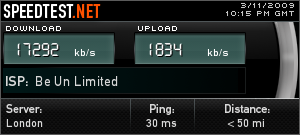
I only activated it this morning, so yet to see if it will be more stable than my previous link which used to drop 3 to 5 times daily, but hopefully now I’ll be abe to play Xbox games while my partner browse stuff, something which previously was totally out of the question.
by R.I. Pienaar | Jan 26, 2009 | Front Page, Usefull Things
I’ve previously mentioned the really great syscfg integrated IPSEC on RedHat Linux here but thought I’d now show a real world example of a Cisco ASA and a RedHat machine talking since it is not totally obvious and it is not something I seen specifically documented anywhere using Google.
A quick recap: RedHat now lets you build IPSEC VPNs using just simple ifcfg-eth0 style config files.
I’ll quickly show both sides of the config to build a site to site VPN, Site A is a Linux machine with a real IP address while Site B is a Cisco ASA with a private network behind it, the Linux machine has this in /etc/sysconfig/network-scripts/ifcfg-ipsec1:
TYPE=IPSEC
ONBOOT=yes
IKE_METHOD=PSK
SRCGW=1.2.3.4
DSTGW=2.3.4.5
SRCNET=1.2.3.4/32
DSTNET=10.1.1.0/24
DST=2.3.4.5
AH_PROTO=none |
TYPE=IPSEC
ONBOOT=yes
IKE_METHOD=PSK
SRCGW=1.2.3.4
DSTGW=2.3.4.5
SRCNET=1.2.3.4/32
DSTNET=10.1.1.0/24
DST=2.3.4.5
AH_PROTO=none
The pre-shared key is in /etc/sysconfig/network-scripts/keys-ipsec1 as per the RedHat documentation.
The Cisco ASA does not support AH so the big deal here is to disable AH which turns out to be the magic knob to tweak here to make it work.
In this case the Linux Server on Site A has the IP address 1.2.3.4 while the ASA is running on 2.3.4.5, the private network at Site B is 10.1.1.0/24.
On the Cisco the relevant lines of config are:
object-group network siteb_to_sitea_local_hosts
    description Site B to Site A VPN Local hosts
    network-object 10.1.1.0 255.255.255.0
object-group network siteb_to_sitea_remote_hosts
    description Site B to Site A VPN Remote Hosts
    network-object 1.2.3.4 255.255.255.255
    access-list siteb_to_sitea_vpn extended permit ip object-group siteb_to_sitea_local_hosts object-group siteb_to_sitea_remote_hosts

access-list inside_nat_bypass extended permit ip object-group siteb_to_sitea_local_hosts  object-group siteb_to_sitea_remote_hosts

nat (inside) 0 access-list inside_nat_bypass

crypto map outside_map 20 match address siteb_to_sitea_vpn
crypto map outside_map 20 set pfs
crypto map outside_map 20 set peer 1.2.3.4
crypto map outside_map 20 set transform-set ESP-3DES-SHA
crypto map outside_map 20 set security-association lifetime seconds 3600
crypto map outside_map 20 set security-association lifetime kilobytes 4608000
crypto map outside_map interface outside
crypto isakmp enable outside

crypto ipsec transform-set ESP-3DES-SHA esp-3des esp-sha-hmac

crypto isakmp policy 20
    authentication pre-share
    encryption 3des
    hash sha
    group 2
    lifetime 28800

tunnel-group 1.2.3.4 type ipsec-l2l
tunnel-group 1.2.3.4 ipsec-attributes
pre-shared-key secret |
object-group network siteb_to_sitea_local_hosts
description Site B to Site A VPN Local hosts
network-object 10.1.1.0 255.255.255.0
object-group network siteb_to_sitea_remote_hosts
description Site B to Site A VPN Remote Hosts
network-object 1.2.3.4 255.255.255.255
access-list siteb_to_sitea_vpn extended permit ip object-group siteb_to_sitea_local_hosts object-group siteb_to_sitea_remote_hosts
access-list inside_nat_bypass extended permit ip object-group siteb_to_sitea_local_hosts object-group siteb_to_sitea_remote_hosts
nat (inside) 0 access-list inside_nat_bypass
crypto map outside_map 20 match address siteb_to_sitea_vpn
crypto map outside_map 20 set pfs
crypto map outside_map 20 set peer 1.2.3.4
crypto map outside_map 20 set transform-set ESP-3DES-SHA
crypto map outside_map 20 set security-association lifetime seconds 3600
crypto map outside_map 20 set security-association lifetime kilobytes 4608000
crypto map outside_map interface outside
crypto isakmp enable outside
crypto ipsec transform-set ESP-3DES-SHA esp-3des esp-sha-hmac
crypto isakmp policy 20
authentication pre-share
encryption 3des
hash sha
group 2
lifetime 28800
tunnel-group 1.2.3.4 type ipsec-l2l
tunnel-group 1.2.3.4 ipsec-attributes
pre-shared-key secret
Using these specific phase 1 and phase 2 parameters – timings, pfs, crypto etc – means that it will match up with the default out-the-box parameters as per /etc/racoon/racoon.conf thereby minimizing the amount of tweaking needed on the RedHat machine
All that is needed now is to start the VPN using /etc/sysconfig/network-scripts/ifup ifcfg-ipsec1 and you should be able to communicate between your nodes.
by R.I. Pienaar | Oct 11, 2008 | Usefull Things
I live in a pretty typical for London double story house, my study is upstairs with TV etc downstairs. Till now I just use a Wireless N router to get connectivity downstairs but it’s proven to be less than reliable. Additionally my ADSL router was upstairs – but on an extension and not on the main plug, it’s a recipe for disaster.
I’ve considered many options, long cables and all sorts of things like this. Today while wandering through PC shops trying to find a decent USB reader I again noticed the Homeplug devices and thought I’ll give them a try.
I bought 3 units of the Devolo dLAN 200 AVeasy units, they are 200Mbps maximum devices and support all sorts of fancy things like AES Encryption and basically an ACL of sorts to only allow certain devices to talk to each other. You can essentially create a VLAN by giving groups of devices different passwords etc.
At first I was fairly sceptical but figured it’s worth a shot, I am glad to say the devices totally exceeded my wildest expectations.
Installation was a breeze, pop them into the wall, plug in cables and it all just work. Of course it is not secured by default so I went digging through their site, the docs and so forth is pretty crap to say the least but I found software for Linux, Windows and OS X to manage them. Each device has a security id on the back and you just type the keys for all your devices into the app and provide a password. This gets used to secure the network with AES.
I have now moved my router and firewall machine downstairs to the main socket – ADSL is now much stabler – and have moved the Wifi router downstairs too via the Devolo units. Overall the whole setup just works great, even my Xbox is working great again after my old Wireless Bridge died.
I use a 1GB switch on my LAN and get around 0.3ms ping times in general, if I ping a device on the other end of the Devolo units ping times are around 4ms, transfer speeds over the units are around 7MB/sec when using scp, these figures are very respectable and much better than I had hoped for in the past while considering them.
At +- 50 GBP per unit and the sacrifice of a wall socket its a pretty expensive solution (other manufacturers apparently have ones that act as a network and power adapter so you don’t waste a port) but for me this has proven to be an excellent solution and completely sorted out my network reliability issues.
by R.I. Pienaar | Apr 13, 2008 | Usefull Things
Back in 2004 I posted about The Regex Coach, its a great app that I still use today, however it only really works on Windows so I have been looking for some alternatives.
There is a really great resources called Regular-Expressions.info it even has a cheap tool that you can use to do something similar to The Regex Coach. Today Lifehacker mentioned RegExr, its a great web app but also has standalone versions for Windows, Linux and OS X, full of sample regular expressions, good explanations of what a regular expression parses as etc, it is a perfect replacement for The Regex Coach, worth checking it out!
by R.I. Pienaar | Feb 13, 2008 | Front Page, Usefull Things
Today on freshmeat I noticed 2 useful utilities for anyone running Xen Servers.
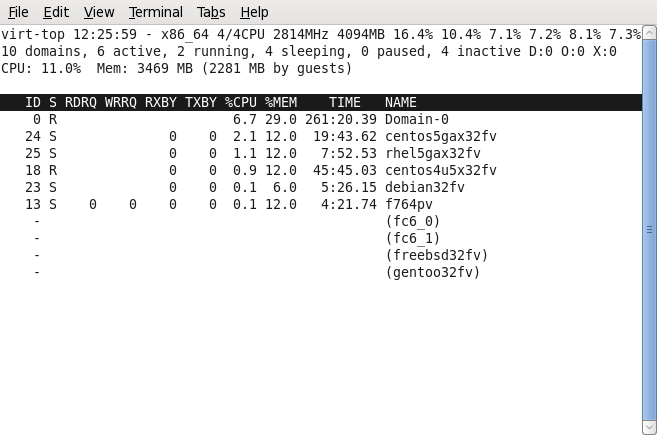
The first is called Virt-top it is a easier to read top like tool than xm top that shows all virtual machines memory and CPU usage in a nice display including totals etc:
The other – Virt-P2V – it’s a CD Image that you can boot a physical machine with that will then convert it to a virtual machine for you. It will scp the drive image to a destination of your choice and create a config file to boot it after asking you some questions. I intend to use this to move a VMWare virtual machine to Xen soon, will post here and see how it goes.
Both of these come from a Red Hat employee, with some luck we’ll see these included in Red Hat Linux soon.
by R.I. Pienaar | Jan 9, 2008 | Usefull Things
This is probably old news to most people but I need to remember this so I figured I may as well blog it.
I made a mysqldump that just takes all databases into a single file, already I want to kick myself because I know if I ever need to import it there will be troubles because the target database will already have the mysql database etc.
Really I should have used MySQL Parallel Dump that makes files per tables etc and is much faster but it didn’t exist at the time.
So how to pull lines 8596 to 9613 from this big file? It’s trivial with sed:
here is a sample file:
$ cat > file.txt
line 1
line 2
line 3
line 4
line 5
^D
$ sed -n '2,4p;4q' file.txt
line 2
line 3
line 4
The sed command just tells it the start to end line and also to quit processing when it hits the end line, really kewl.

